
So, how many Cat 6 cables can fit into a 2-inch conduit? Generally, a 2-inch conduit can safely accommodate around 30-40 Cat 6 cables, depending on the specific cable construction and the application of conduit fill ratios.
Running data cables, especially Ethernet cables like Cat 6, through conduit is a smart move for protection and organization. It keeps your network tidy and your cables safe from damage. But when you’re planning a network installation, a key question pops up: “How many Cat 6 cables can I actually fit into a 2-inch conduit?” This isn’t just a simple counting exercise; it involves understanding some important guidelines and calculations to ensure your installation is safe, efficient, and compliant with electrical codes.
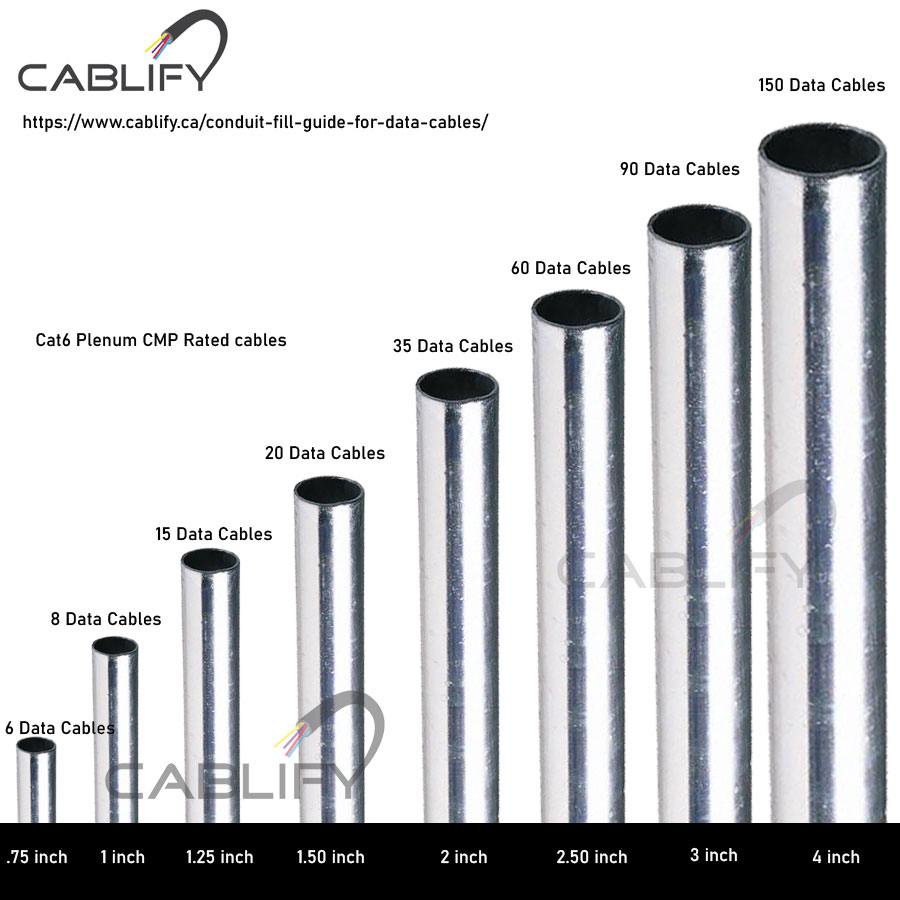
Image Source: www.cablify.ca
Deciphering Conduit Fill Ratios
The National Electrical Code (NEC) is the guiding document for electrical installations in North America. It sets strict rules for how much space cables can take up within a conduit to prevent overheating and make future cable pulling easier. This is known as the Cat 6 conduit fill ratio. The NEC limits the total cross-sectional area of cables within a conduit to a specific percentage of the conduit’s internal cross-sectional area.
Why is this so important?
- Heat Dissipation: Cables generate heat when electricity flows through them. If too many cables are packed tightly together in a conduit, heat can build up. This can degrade the cable insulation, reduce performance, and even create a fire hazard.
- Ease of Pulling: Trying to pull too many cables through a conduit can be incredibly difficult. Cables can snag, stretch, or even break if there isn’t enough room to maneuver them. This is especially true for longer runs.
- Future Expansion: You might not need to add more cables today, but it’s always good practice to leave some room for potential upgrades or additions down the line. Overfilling a conduit now can mean having to run a new conduit later, which is extra work and cost.
The NEC provides tables that specify the maximum allowable fill percentages based on the type of conduit and the number of wires or cables. For conduits containing more than two conductors or cables, the fill is generally limited to 40% of the conduit’s internal cross-sectional area. This 40% rule is a critical factor when calculating Ethernet cable conduit capacity.
Calculating 2 Inch Conduit Cable Capacity
To figure out 2 inch conduit cable capacity, we need to do a little math. We need to know the internal diameter of the conduit and the outer diameter of the Cat 6 cables we plan to use.
Conduit Dimensions
A standard 2-inch trade size conduit doesn’t have an internal diameter of exactly 2 inches. The actual internal diameter varies slightly depending on the conduit material (e.g., PVC, EMT – Electrical Metallic Tubing). For this calculation, we’ll use common internal dimensions.
Let’s assume a 2-inch EMT conduit, which often has an internal diameter of approximately 2.066 inches.
The cross-sectional area of the conduit is calculated using the formula for the area of a circle: $Area = \pi \times (radius)^2$.
- Radius = Internal Diameter / 2
- Radius = 2.066 inches / 2 = 1.033 inches
- Conduit Internal Area = $\pi \times (1.033 inches)^2 \approx 3.35 square inches$.
Cat 6 Cable Dimensions
Cat 6 cables, while standardized in performance, can have slightly different outer diameters (OD) based on the manufacturer, whether they are solid or stranded, shielded or unshielded (UTP vs. STP/FTP), and the thickness of the jacket.
- Unshielded Cat 6 (UTP): Typically around 0.21 to 0.25 inches in diameter.
- Shielded Cat 6 (STP/FTP): Often slightly larger, around 0.25 to 0.30 inches in diameter, due to the additional foil or braid shielding.
For our calculations, let’s use an average outer diameter for a UTP Cat 6 cable of 0.23 inches.
- Radius of Cat 6 cable = 0.23 inches / 2 = 0.115 inches
- Cross-sectional Area of one Cat 6 cable = $\pi \times (0.115 inches)^2 \approx 0.0415 square inches$.
Applying the Fill Ratio
Now, we apply the 40% fill ratio to the conduit’s internal area:
- Allowable Fill Area = 40% of Conduit Internal Area
- Allowable Fill Area = 0.40 * 3.35 square inches $\approx 1.34$ square inches.
This is the maximum total area that cables can occupy within the 2-inch conduit.
Calculating the Number of Cables
To find out how many Cat 6 cables can fit, we divide the allowable fill area by the cross-sectional area of a single Cat 6 cable:
- Number of Cables = Allowable Fill Area / Area of one Cat 6 cable
- Number of Cables = 1.34 square inches / 0.0415 square inches $\approx 32.3$ cables.
Since you can’t have a fraction of a cable, we round down to the nearest whole number to stay within the safe limit.
Therefore, approximately 32 UTP Cat 6 cables with a 0.23-inch diameter can fit into a 2-inch EMT conduit according to the 40% fill ratio.
What About Shielded Cat 6?
If you are using shielded Cat 6 cables, which are typically larger (let’s say 0.28 inches OD), the calculation changes:
- Radius of Shielded Cat 6 cable = 0.28 inches / 2 = 0.14 inches
- Cross-sectional Area of one Shielded Cat 6 cable = $\pi \times (0.14 inches)^2 \approx 0.0616$ square inches.
Using the same 40% allowable fill area (1.34 sq inches):
- Number of Cables = 1.34 square inches / 0.0616 square inches $\approx 21.75$ cables.
Rounding down, this means approximately 21 shielded Cat 6 cables can fit in the same 2-inch conduit.
Factors Influencing Actual Cable Count
While the 40% fill ratio is the standard, several other factors can influence how many cables you can realistically and safely install:
Cable Diameter Variations
As we saw, the outer diameter (OD) of Cat 6 cables can vary significantly between manufacturers and cable types. Always check the manufacturer’s specifications for the exact OD of the cables you are using. Using a conduit fill calculator can be very helpful here, as most allow you to input specific cable dimensions.
Conduit Type and Internal Diameter
Different types of conduit have different internal diameters even when they share the same trade size.
- PVC Conduit: Often has a slightly larger internal diameter than EMT, potentially allowing for a few more cables.
- EMT (Electrical Metallic Tubing): Commonly used for indoor installations, it has a specific set of internal dimensions.
- Flexible Conduit: The corrugated nature of flexible conduit can sometimes make pulling cables more challenging, and its effective internal diameter might be slightly less than rigid conduit.
Number of Bends
Each bend in a conduit run creates friction and makes pulling cables harder. The NEC limits the number of 90-degree bends between pull points to four. More bends mean more difficulty in pulling and a higher risk of damaging cables, even if the fill ratio isn’t exceeded. It’s generally recommended to keep bends smooth and gradual.
Cable Jacket Material and Lubricant
The type of jacket material on the cable (e.g., PVC, LSZH – Low Smoke Zero Halogen) can affect its flexibility and friction. Using a cable lubricant specifically designed for data cables can significantly ease the pulling process, allowing you to potentially pull more cables or longer runs without damage.
Future Needs and Cable Management
When planning your cable management conduit, it’s wise to consider future needs. If you anticipate adding more network devices or upgrading to faster Ethernet standards (like Cat 6a or Cat 7, which have thicker jackets), leaving some extra space is a good idea. Overfilling the conduit to the absolute maximum might satisfy the initial requirement but could create significant problems later. Proper cable management conduit strategies involve thinking ahead.
Type of Installation
- Residential vs. Commercial: While the NEC applies to both, commercial installations often have more stringent requirements and are subject to inspections.
- Environmental Factors: In areas with high ambient temperatures, the heat buildup from cables becomes an even more critical concern.
Using a Conduit Fill Calculator
To simplify these calculations, there are numerous online conduit fill calculator tools available. These calculators typically require you to input:
- The trade size of the conduit (e.g., 2 inch).
- The type of conduit (e.g., EMT, PVC).
- The number of cables you plan to run.
- The outer diameter (OD) of each cable.
The calculator will then tell you the percentage of fill and whether your planned installation is compliant with NEC guidelines. This is a far more accurate and user-friendly method than manual calculation for complex installations.
Cat 6 Cable Bundling and Network Cable Conduit
When discussing Cat 6 cable bundling within a conduit, it’s important to distinguish between bundling for organizational purposes before pulling and the resulting bundle after pulling. While you might bundle cables temporarily, the conduit fill calculation is based on the individual cable diameters.
Using conduit is a fundamental aspect of robust network cable conduit design. It protects your valuable data infrastructure. When designing or expanding your network, consider the conduit system as a whole. This includes the conduit size, the number and type of cables it will house, the pulling methods, and the termination points.
Maximum Cat 6 Runs
The question of maximum Cat 6 runs is related but distinct. The NEC, and industry standards for Ethernet, specify a maximum length for a single Ethernet cable segment to ensure reliable signal transmission. For standard Cat 6, this limit is generally 100 meters (328 feet) for the horizontal cabling (connecting the workstation to the patch panel or switch). This limit applies regardless of whether the cable is in conduit or not.
Running cables through conduit doesn’t inherently change the maximum segment length, but the ease of pulling through conduit can affect the practicality of achieving those maximum lengths, especially with multiple bends or tight fills.
Practical Considerations for Pulling Cables
Even if your calculations suggest a certain number of cables will fit, the actual pulling process can be challenging.
- Cable Lubricant: As mentioned, specialized cable lubricants can significantly reduce friction, making it easier to pull cables through conduit, especially for long runs or when the conduit has several bends.
- Pulling Socks/Grips: These attach to the end of the cable to provide a secure grip for pulling.
- Fish Tapes/Rods: These are tools used to guide the cables through the conduit.
- Pilot Lines: For very long or complex runs, a strong pilot line can be pulled through first, to which the data cables can then be attached and pulled.
- Multiple Pulls: For very large numbers of cables, it might be more practical to make multiple pulls, rather than trying to pull dozens of cables simultaneously.
Frequently Asked Questions (FAQ)
Q1: Can I mix different types of cables in the same conduit?
A1: Yes, you can mix different types of cables (e.g., Cat 6, Cat 6a, coax, low-voltage control cables) in the same conduit, provided they are all rated for use in conduit. However, you must calculate the total fill based on the individual cross-sectional areas of all cables within the conduit and ensure the total fill does not exceed the allowable percentage (usually 40%). You also need to consider potential interference between different types of cables, though typically Cat 6 is well-shielded against common interference sources when properly installed.
Q2: Does the color of the Cat 6 cable affect how many fit?
A2: No, the color of the Cat 6 cable does not affect how many fit in a conduit. The determining factor is the cable’s outer diameter (OD).
Q3: What happens if I exceed the conduit fill ratio?
A3: Exceeding the conduit fill ratio is a violation of electrical codes like the NEC. It can lead to:
* Difficulty pulling cables, potentially damaging them.
* Overheating of the cables due to poor heat dissipation, leading to performance degradation or failure.
* Increased strain on the cables.
* Failure to pass electrical inspections.
Q4: Is it okay to use more than 40% fill for a single cable run?
A4: No, the NEC explicitly limits conduit fill. For conduits containing more than two conductors or cables, the general rule is a maximum of 40% fill. There are exceptions for specific scenarios or cable types (e.g., 60% for single conductors), but for bundled Ethernet cables, 40% is the standard to adhere to.
Q5: How do I find the outer diameter (OD) of my Cat 6 cables?
A5: The OD of your Cat 6 cables should be listed on the cable’s packaging, on the cable’s jacket itself (often printed periodically along its length), or in the manufacturer’s product datasheet. If you cannot find this information, you can measure it carefully with a caliper.
Q6: Can I run Cat 6 cables in electrical conduit with power cables?
A6: It is generally not recommended to run low-voltage data cables (like Cat 6) in the same conduit as high-voltage power cables. This is to prevent electromagnetic interference (EMI) from the power cables from affecting the data signals. While some shielding exists on data cables, running them in separate conduits or maintaining adequate separation is best practice for optimal network performance. Consult the NEC for specific guidelines on mixed occupancy of conduits.
Q7: What are the alternatives if 2-inch conduit isn’t enough for my cables?
A7: If a 2-inch conduit cannot accommodate your projected cable count, you have several options:
* Use a Larger Conduit: Consider a 3-inch conduit, which will significantly increase your Ethernet cable conduit capacity.
* Split the Runs: Divide your cables into multiple smaller conduit runs.
* External Cable Trays or Raceways: For very high cable counts or when conduit is not feasible, consider using overhead cable trays or surface-mounted raceways for organized cable management conduit.
By carefully considering the Cat 6 conduit fill ratio, the specific dimensions of your cables and conduit, and adhering to electrical code guidelines, you can ensure a safe, efficient, and reliable installation for your network cabling.